Case study — product engineering
RELAY
“The fastest way for field technicians to get the right answer while they're working.”
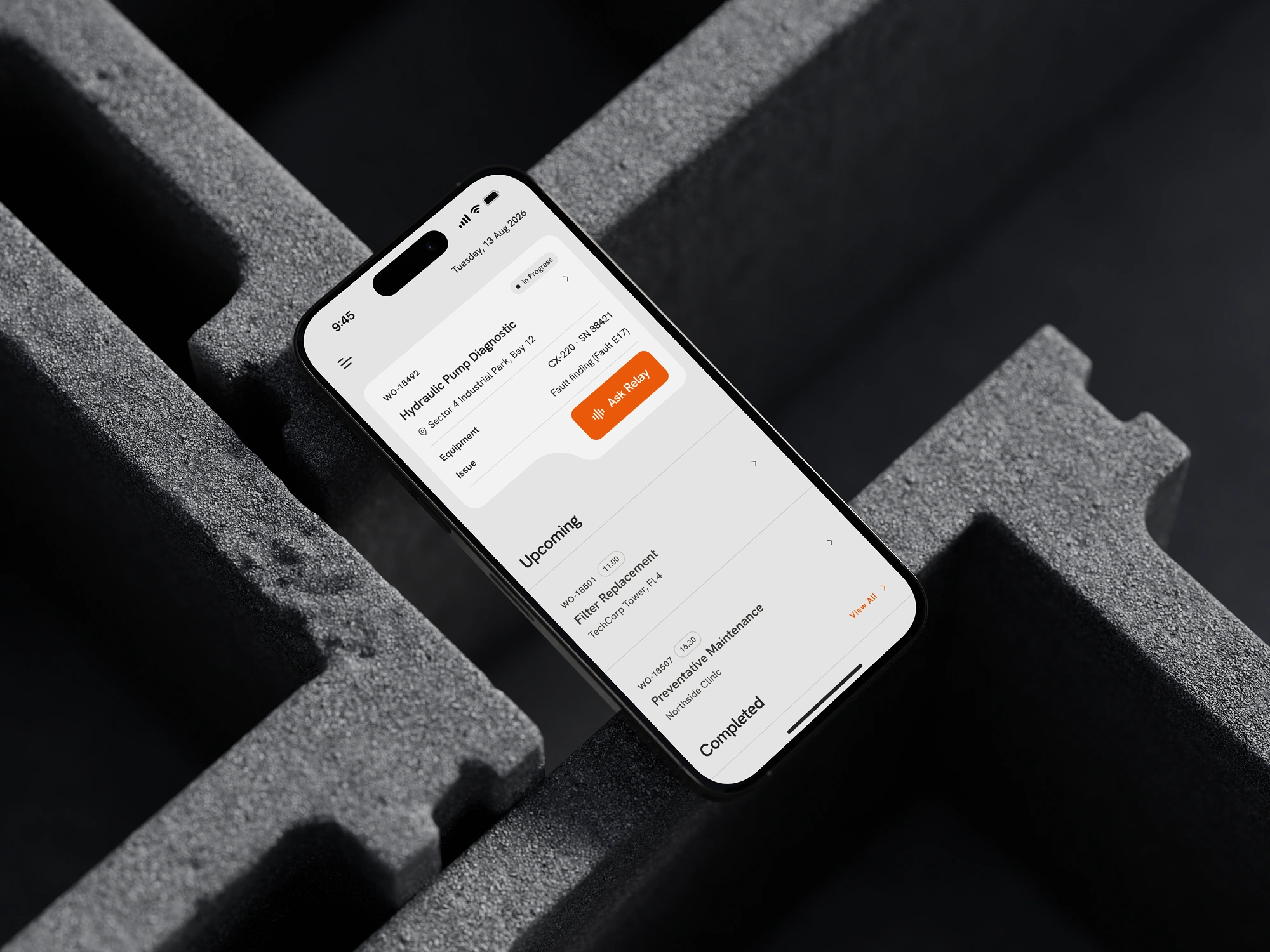
An AI field-knowledge assistant that gives technicians permission-aware, cited answers grounded in company documentation — scoped to the work order they're actually on.
Year
2026 — Present
Role
Product Engineer
Scope
Flutter · Next.js · Supabase · AI
Status
In progress (mid-build)
Overview
Snapshot
- What it is
- An AI field-knowledge assistant that gives technicians permission-aware, cited answers grounded in company documentation — scoped to the work order they're actually on.
- The problem
- Technicians stop working to search manuals or track down a supervisor. Relay collapses that into one spoken question.
- My role
- Solo — product thinking, UX/UI design, the Flutter mobile app, the Next.js admin console, and the retrieval/data architecture underneath.
- Stack
- Flutter · Riverpod · Drift · Next.js · Supabase (Postgres + pgvector) · Vercel AI SDK · Trigger.dev
- Status
- Core troubleshooting flow designed and built end-to-end. Admin console and live data integration are next.
The problem
Stuck at the machine
A technician is elbow-deep in a compressor and hits an error code they don't recognize. From there, they have three bad options: dig through a 124-page PDF manual on a cracked phone screen, call a supervisor who might not pick up, or guess. All three stop the job.
Generic tools don't fix this. Enterprise search returns a list of documents, not an answer. A generic chatbot doesn't know which work order, which asset, or which permission level applies. Neither is built for someone standing at a machine with one hand free.
Enterprise search
Returns a stack of documents. The technician still has to read, find the section, and translate it into an action.
Generic chatbot
Answers questions, but has no idea which work order, asset, or permission level it's answering for.
Relay
Answers first, grounded in the job the technician is actually on — with the evidence attached.
“Don't build a smaller enterprise search engine. Build the fastest path from "I'm stuck" to "I know what to do next."”
Product thinking
Who this is for
ICP: mid-to-large industrial field-service organizations — 500 to 10,000+ employees, multi-site, with a dedicated maintenance or field-service organization already running a digital work-order system.
Primary user: a field or maintenance technician working mobile, hands busy, with no time to research mid-job.
Relay isn't a general-purpose employee chatbot. Scoping it to field troubleshooting is what makes the contextual retrieval and permissioning tractable to build well.
“When I get stuck while working on a job, help me quickly determine what I should do next using information I can trust.”
Architecture
System overview
Relay is three cooperating surfaces: a Flutter mobile client, a Next.js admin console, and a retrieval layer sitting on Postgres. The Vercel AI SDK handles orchestration and streaming; Trigger.dev runs the document pipeline outside the request/response cycle so large manuals never block anything.
| Layer | Choice | Why |
|---|---|---|
| Mobile | Flutter | Single codebase for iOS/Android, native performance for a hands-busy, voice-driven UI. |
| Mobile state | Riverpod | Compile-safe, testable state for a conversation that carries context across turns. |
| Mobile local DB | Drift | Typed local persistence — required for offline-tolerant field use. |
| Admin | Next.js | Shares a TS/React surface with the API layer for fast admin CRUD. |
| Admin state | Zustand | The admin console doesn't need Redux-scale ceremony. |
| Validation | Zod | Shared schemas across the API boundary and admin forms. |
| AI orchestration | Vercel AI SDK | Streaming, tool-calling, and provider abstraction for the retrieval + generation loop. |
| Auth | Supabase Auth | Enterprise SSO without building an IdP integration layer from scratch. |
| DB + vector | Supabase Postgres + pgvector | One database for relational data (work orders, permissions) and vector search — no second system to keep in sync. |
| Files | Supabase Storage | Co-located with the auth/DB permissions model. |
| Document processing | Trigger.dev | Durable background jobs for ingest → chunk → embed → index, off the request/response cycle. |
| Observability | Sentry | Cross-stack error tracking — mobile, web, and edge functions. |
| Deploy | Vercel + Supabase / App Store + Play Store | Managed infra that keeps a solo build shippable. |
Permissions are enforced before retrieval, not after. Unauthorized content should never reach the generation layer — filtering it out afterward means the model has already "seen" something it shouldn't have.
Engineering deep dives
Four hard problems
The interesting parts of Relay aren't the screens — they're the systems underneath them. Four of the harder problems, and where I've landed on each.
Contextual, permission-aware retrieval
Retrieval can't just be query → vector search. Every answer has to condition on who's asking, what work order and equipment they're on, what's already been checked, and what they're allowed to see.
Permissions are filtered before the vector search runs, not after the model has generated a response — so unauthorized content never reaches the generation layer at all.
Conversation state matters too: a follow-up like "what should I check next?" only resolves correctly in light of what's already been ruled out earlier in the same job.
Voice-first interaction pipeline
"Voice in, visual out" is a UX principle, but it's also a latency budget: push-to-talk → speech-to-text → context assembly → retrieval → rendered answer has to stay fast enough not to break whatever the technician is mid-way through doing with their hands.
Text-to-speech is deliberately off by default — specs, part numbers, and warnings are safer read than heard, so the response stays visual even though the question is spoken.

Offline-first mobile architecture
Field environments have unreliable networks by default, not by exception. Drift holds the active work order and recent knowledge on-device as the source of truth; Riverpod coordinates sync state around it.
Freshness has to be visible, not assumed — a cached answer needs to say it's cached, not sit indistinguishable from a live one.
Knowledge ingestion pipeline
Admin uploads run through Trigger.dev as durable background jobs: upload → classify → set permissions → chunk/embed → index → publish. Large PDFs and long-running embedding jobs don't belong in a request/response cycle.
Job-specific attachments (a photo, a customer PDF) stay scoped to that work order by default and don't silently become global company knowledge — that's a permissions and quality-control decision, not just a storage one.
Product flow
From stuck to unstuck
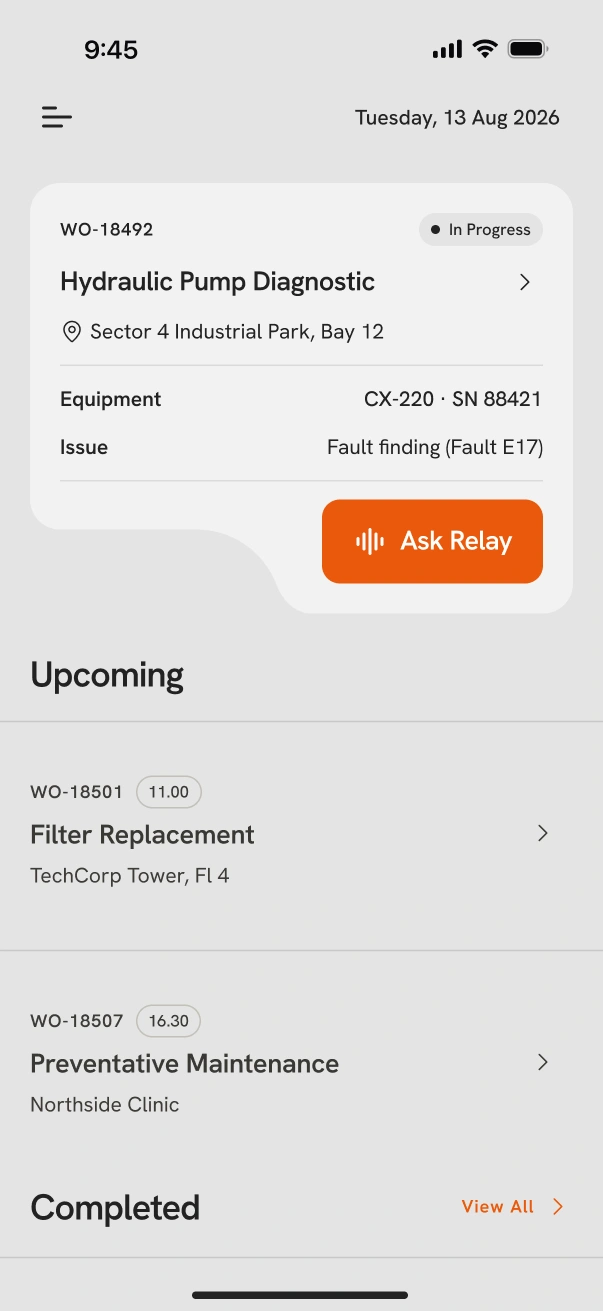
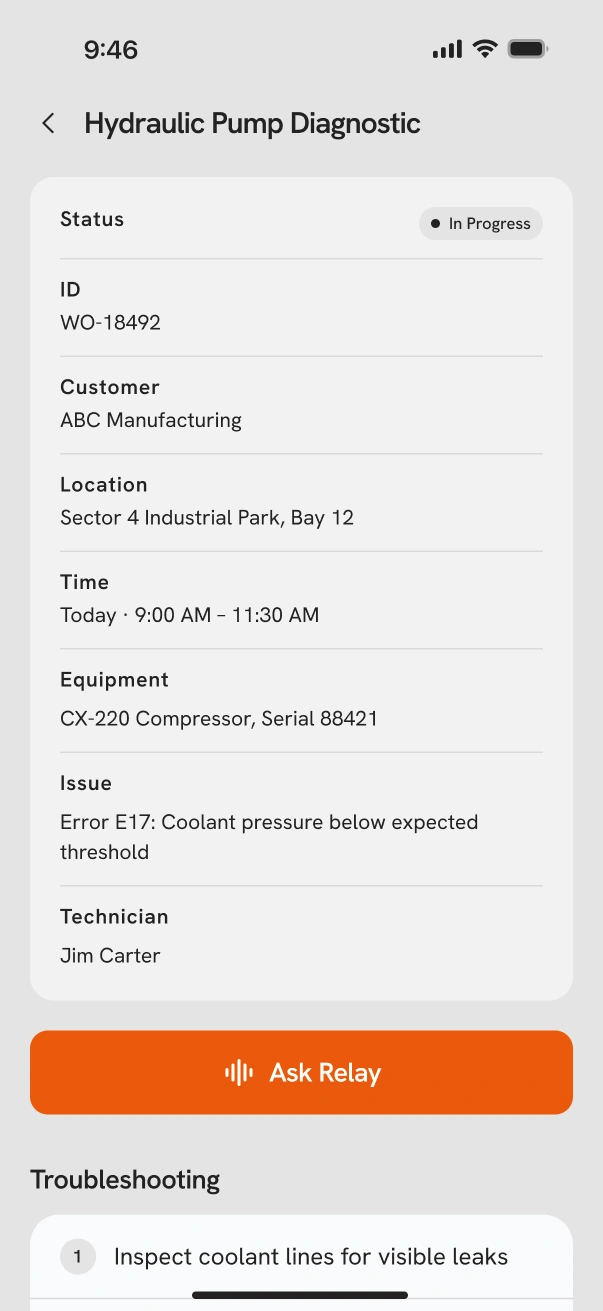
The primary path, screen by screen:
- Opens the active work order
- Taps in for full job context
- Hits Ask Relay and asks a question, out loud
- Gets an answer first, with a citation attached
- Opens the full procedure when the how-to matters
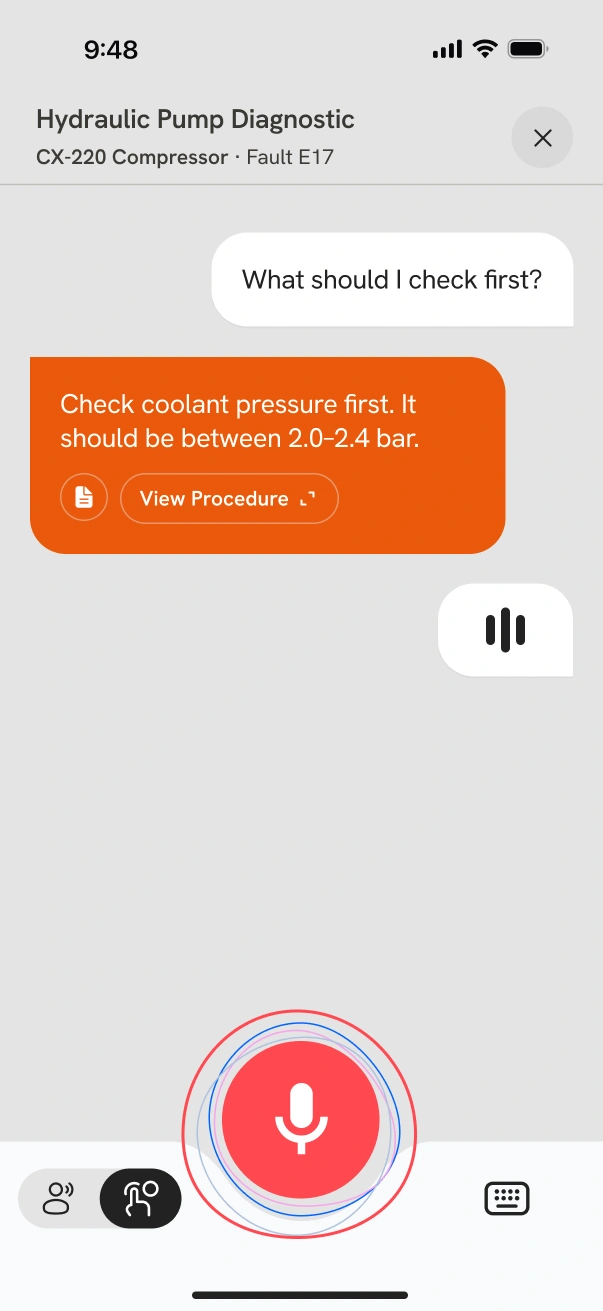
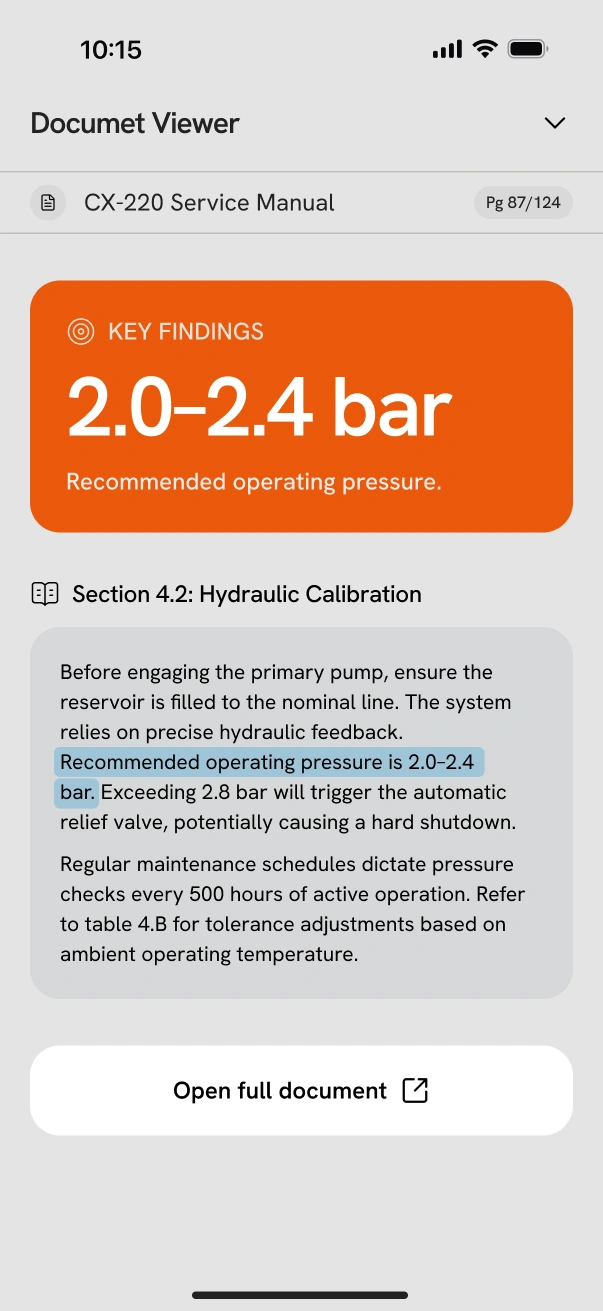
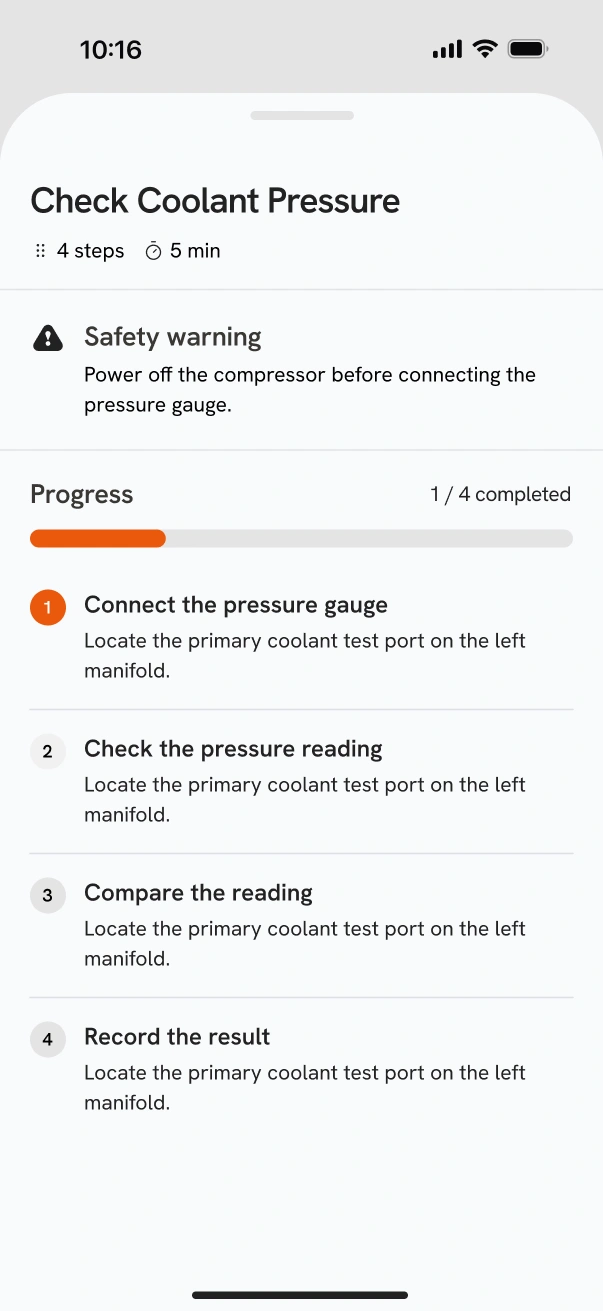
“Answer first, then evidence, then details on demand. The goal isn't to make technicians better at searching — it's to let them not stop working.”
Trust
Grounded, or honest about it
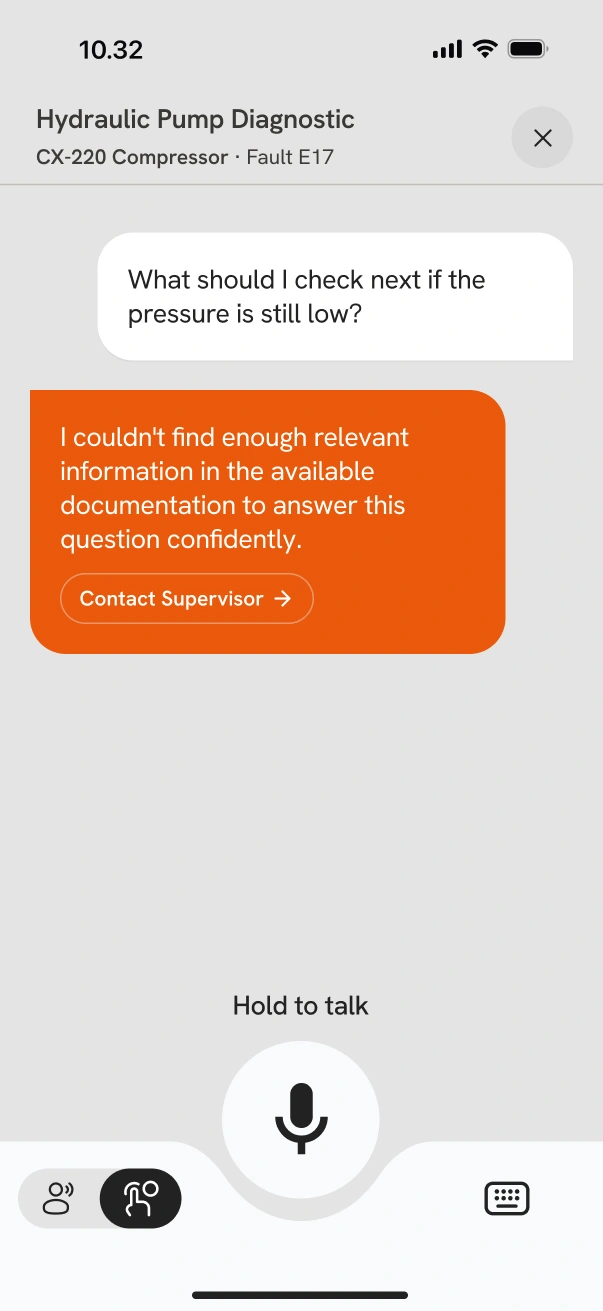
Every factual claim needs retrieved evidence and a citation the technician can actually open. When there isn't enough evidence, Relay says so and offers an exit ramp instead of guessing.
“I couldn't find enough relevant information in the available documentation to answer this question confidently.”
That's a system property, not a prompt trick — it falls out of permission-first retrieval and an explicit uncertainty threshold, with escalation built in as the designed exit, not a dead end.
Status
Where this actually is
I'm sharing this mid-build. The architecture and system-design decisions are as much the work here as the finished UI — and most real projects look like this, not like a finished highlight reel.
- —Product positioning & ICP locked
- —Core troubleshooting UX flow & UI
- —System architecture & stack decisions
- —Remaining mobile UI — profile, settings, history
- —Web admin console — integrations, knowledge, permissions
- —API / data integration & live retrieval
- —Deployment
Roadmap
What's next, in order
Finish mobile UI
Profile, settings, history — completes the app shell before wiring real data.
Web admin console
Integrations, knowledge management, permissions. Needed before retrieval can run against real, permissioned content.
API & data integration
Connect the designed retrieval pipeline to live work-order and document data.
Deploy
App Store & Play Store for mobile; Vercel & Supabase for the admin console and backend.
Open questions
What I'm still deciding
Which field-service platform to integrate first
Salesforce Field Service, Dynamics 365 Field Service, Zoho FSM, Odoo, or something smaller — still open. Each implies a different auth model, data shape, and sync/webhook pattern, so this decision will likely shape the API layer more than any other choice left. Leaning toward picking based on which platform shows up most often in the target ICP, not which has the nicest API.
Offline conflict resolution
What happens when a technician's cached answer disagrees with a document that was just republished mid-shift. Haven't settled on a resolution strategy yet.
Chunking strategy for long manuals
Long, table-heavy service manuals don't chunk cleanly. Still testing chunking strategies against retrieval quality before locking one in.
Role
Built solo, end to end
Product thinking, UX/UI design, the Flutter mobile app, the Next.js admin console, and the data/retrieval architecture underneath — one person, one project.
“Relay is still being built. If you want to see it as it develops — or talk through any of the architecture above — I'd like that.”
Read Next Case Study
Lume